iOS SDK
블럭스 iOS SDK 를 설치하고 사용하는 방법을 알아봅니다.
푸시 메시지 연동
Xcode 설정
Notification Capability 추가
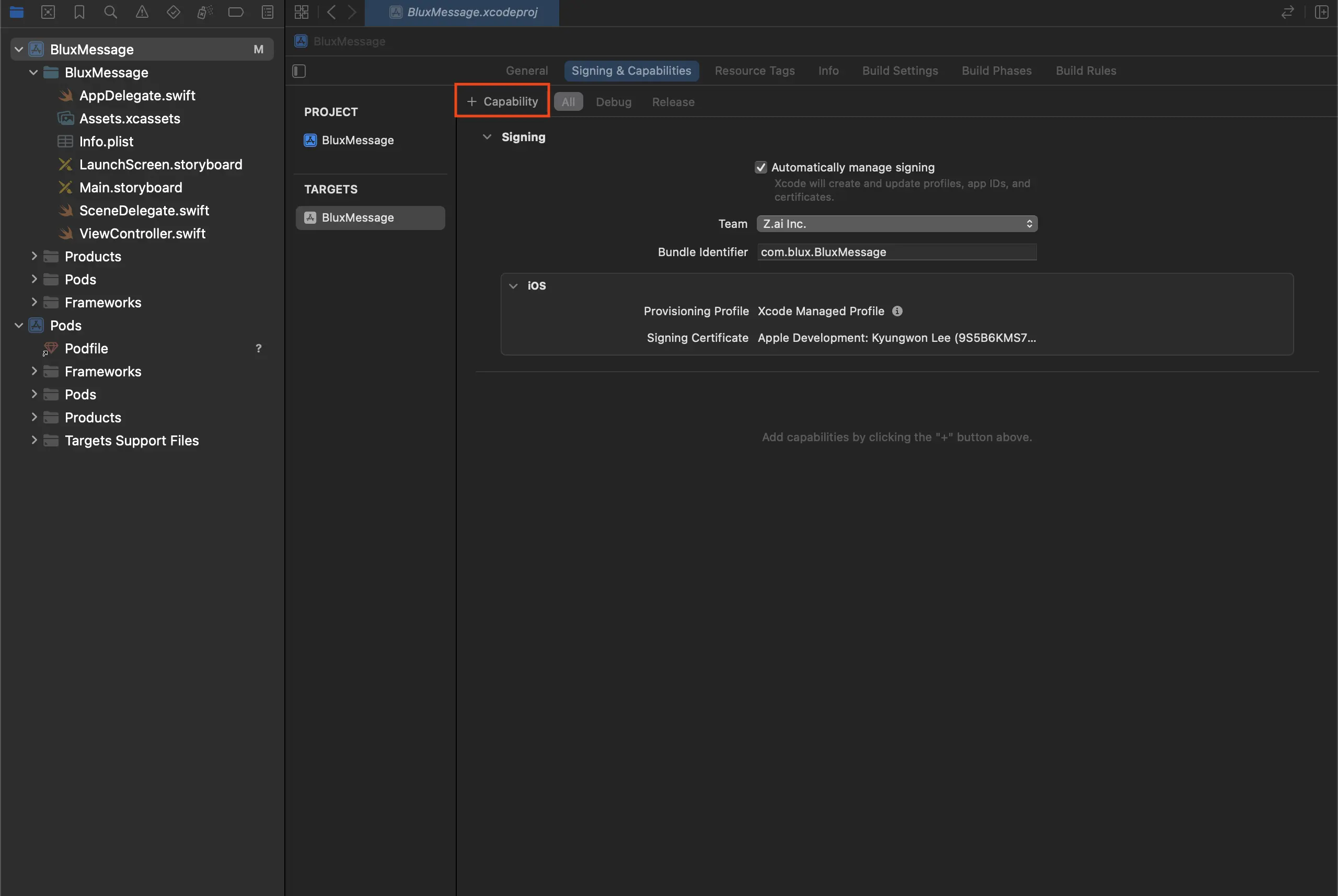
- Xcode 프로젝트 설정의 Signing & Capabilities 탭에서 + Capabilities를 클릭하세요.
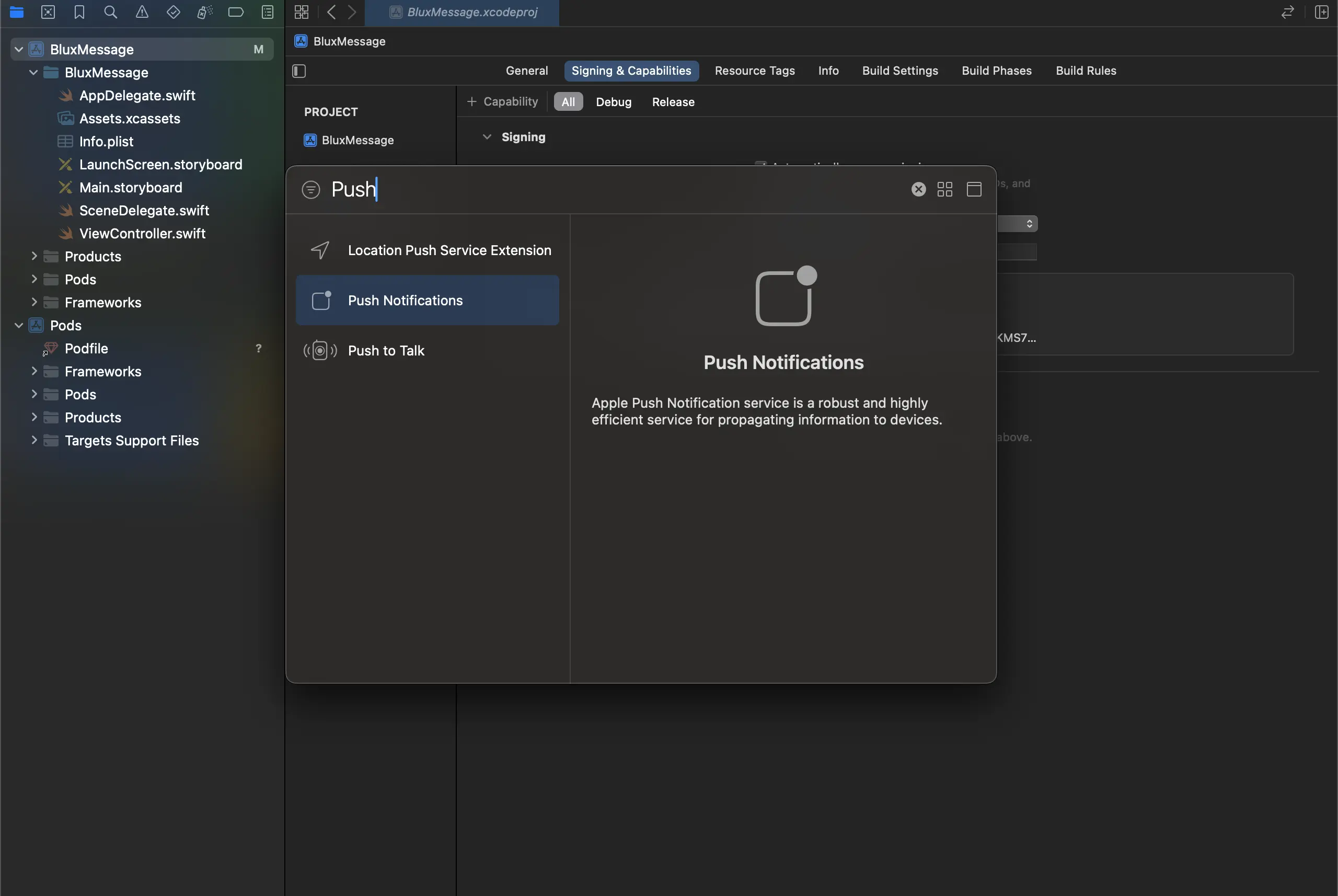
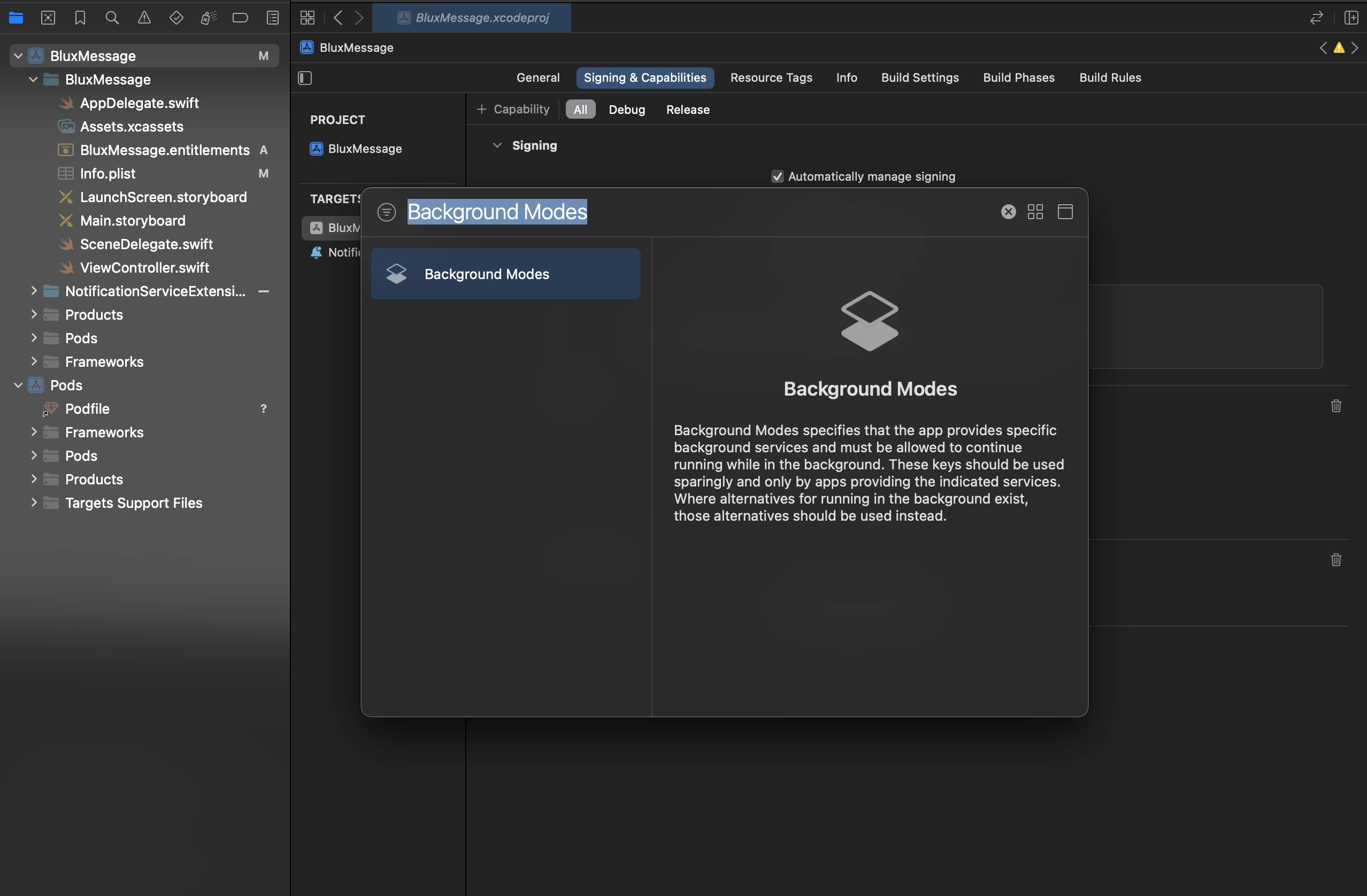
- Push Notifications와 Background Modes를 추가하세요.
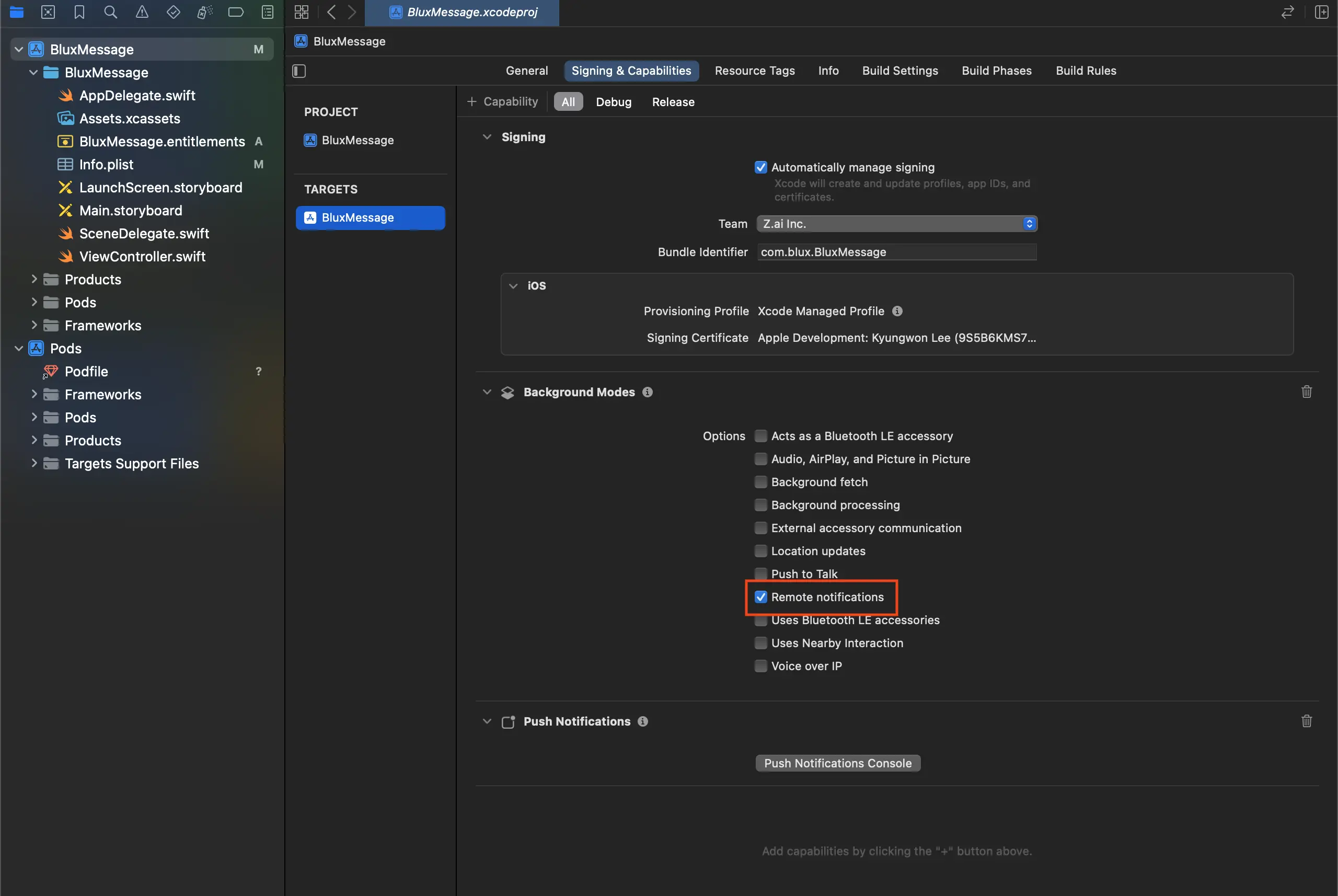
- Background Modes에서 Remote notifications를 활성화하세요.
Service Extension 설정
- Xcode 프로젝트 상단
File > New > Target을 클릭하고 아래와 같이 Notification Service Extension을 선택하세요.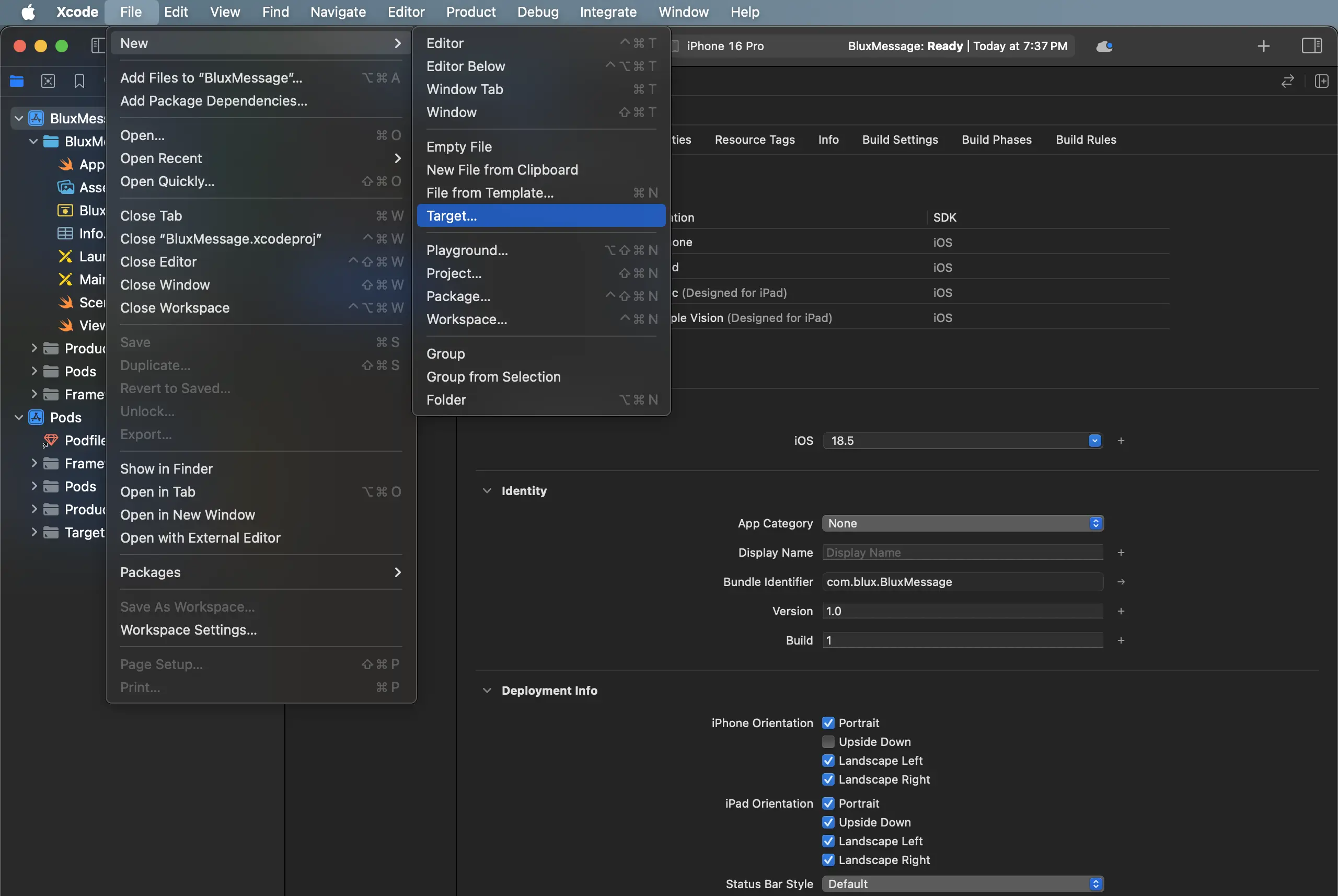
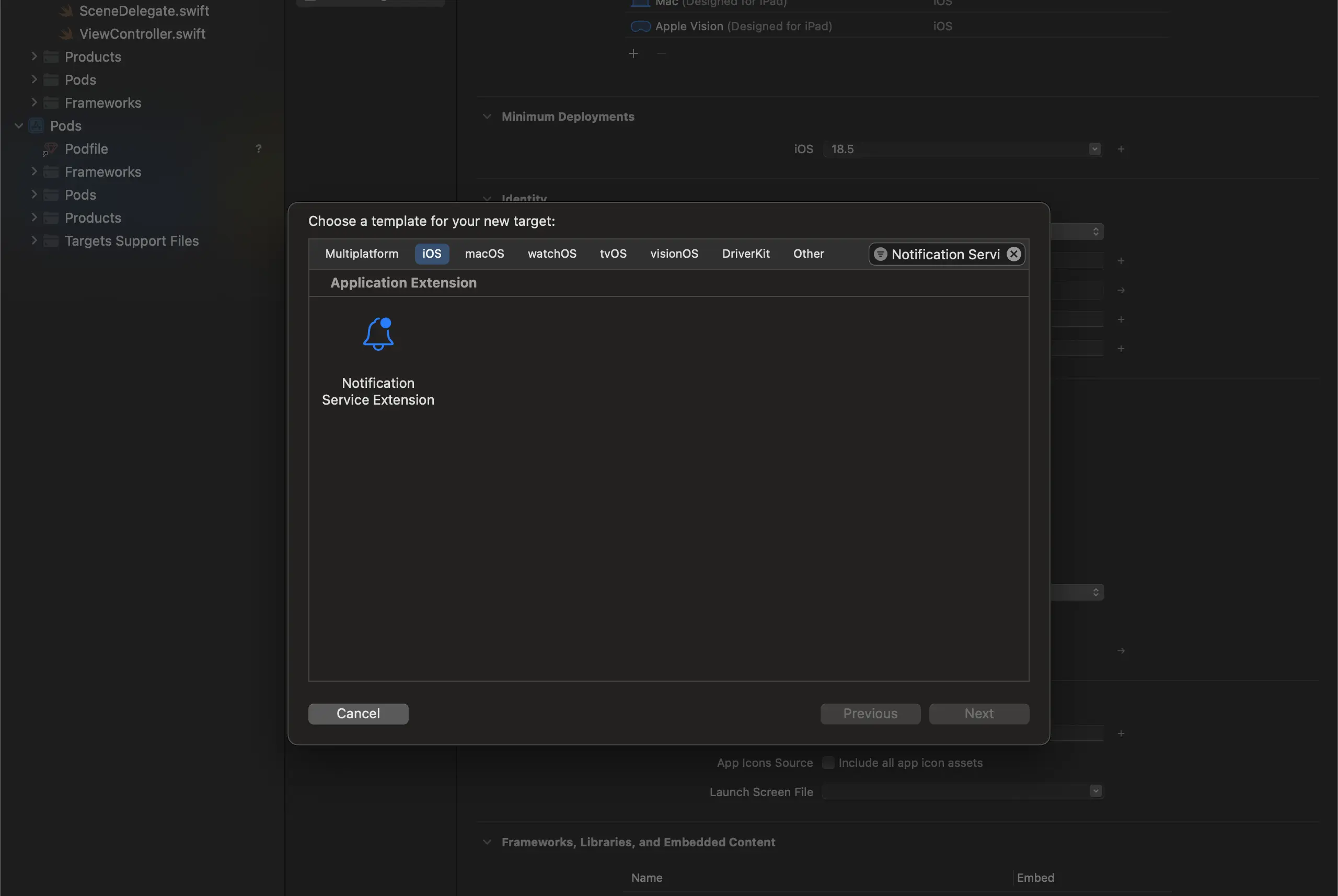
- 아래와 같이 알맞는 이름을 입력 후 Finish를 클릭하세요.
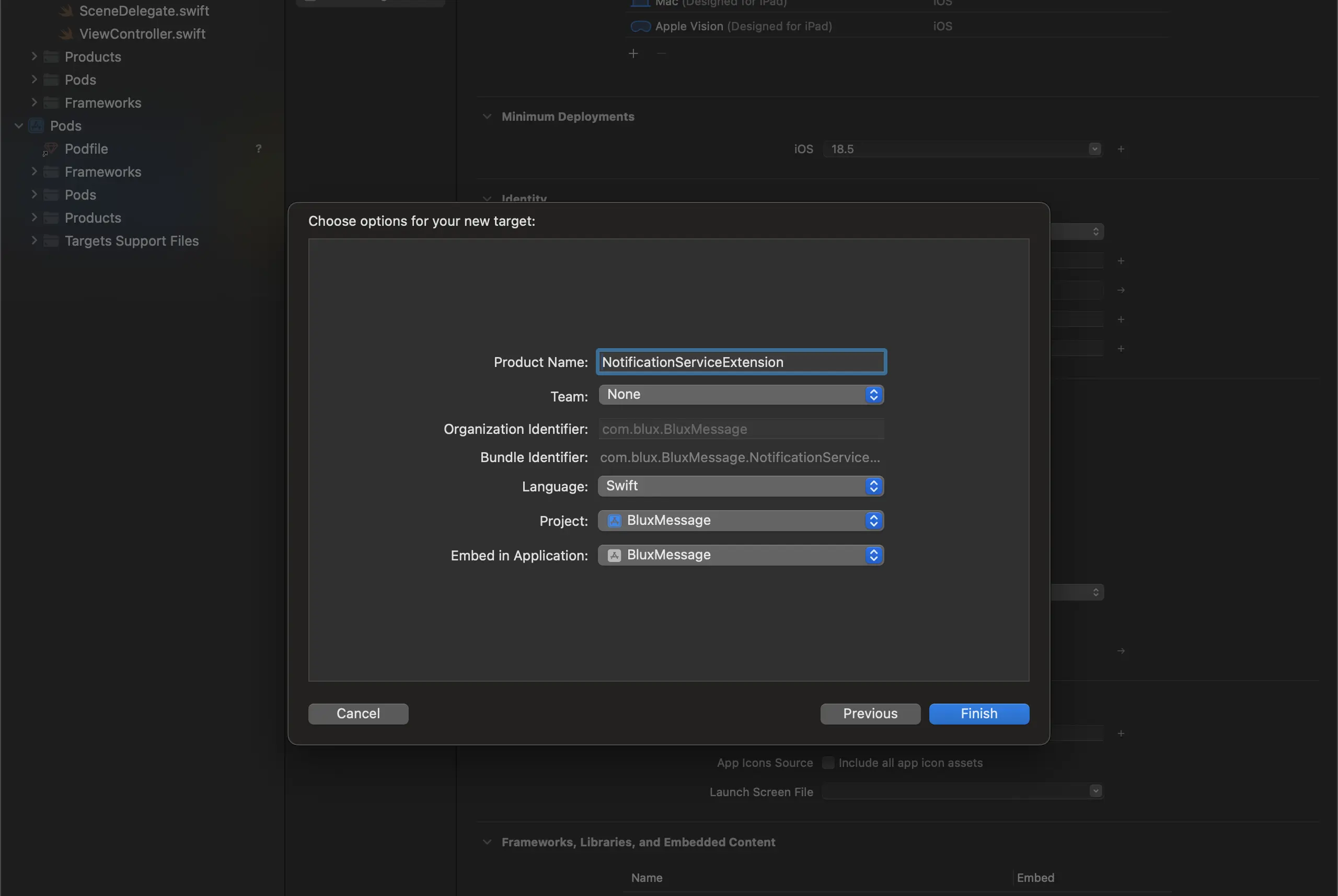
- 표시되는 팝업에서 Don't Activate를 클릭하여 별도의 Scheme을 활성화하지 않도록 합니다.
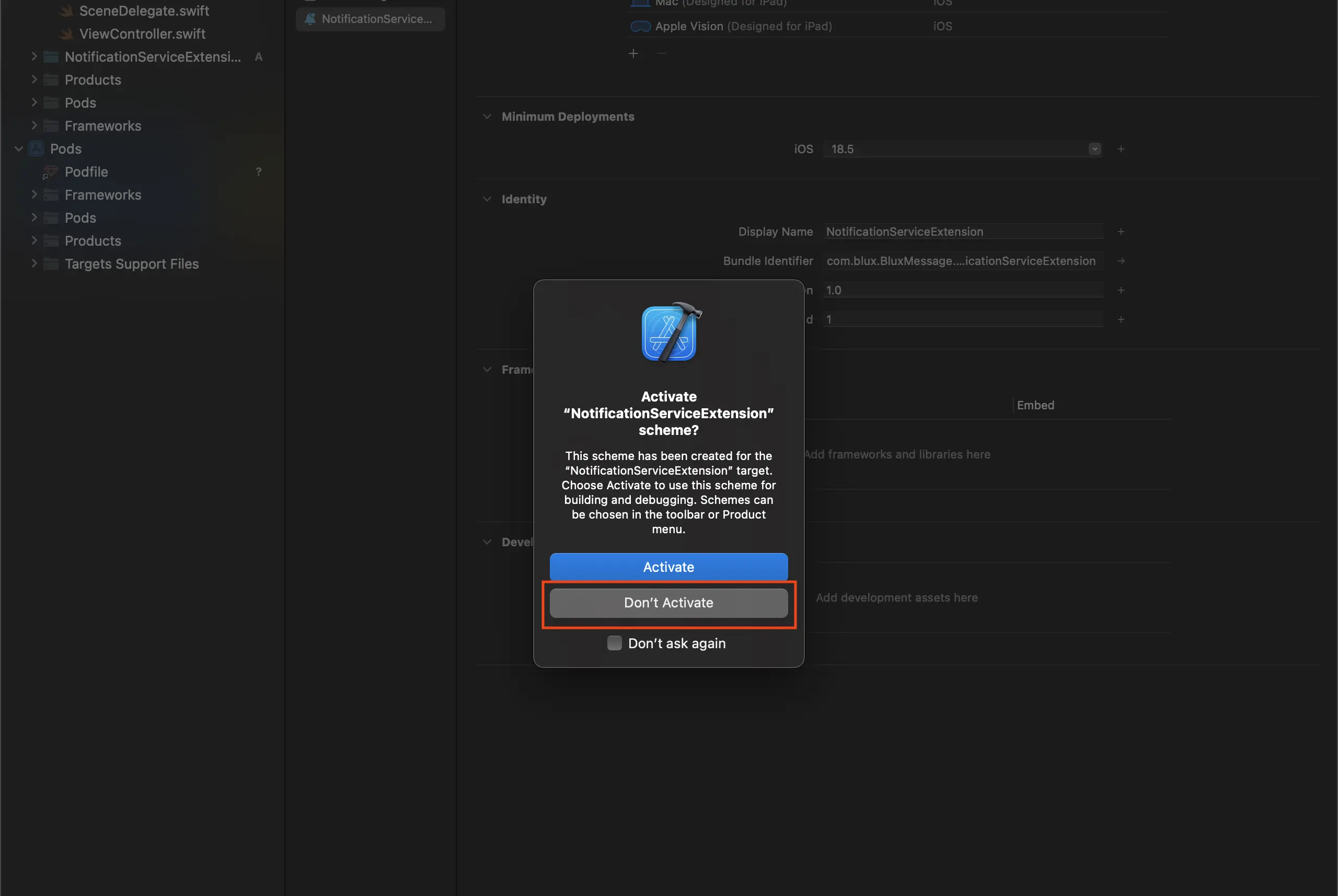
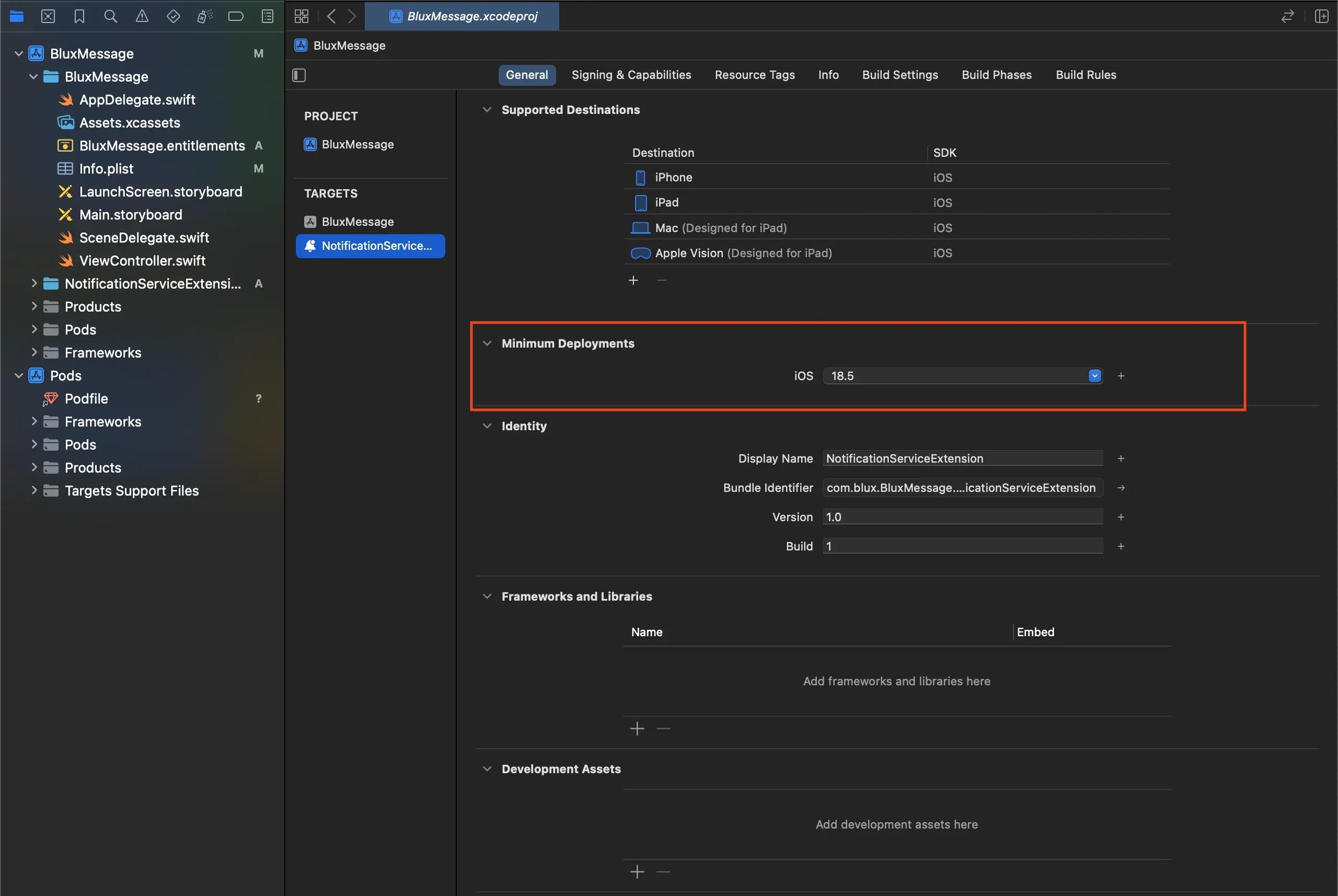
- 이후 Notification Service Extension Target의 Minimum Deployments 버전을 현재 사용 중인 메인 앱 Target의 버전과 동일하게 설정합니다.
App Group 추가
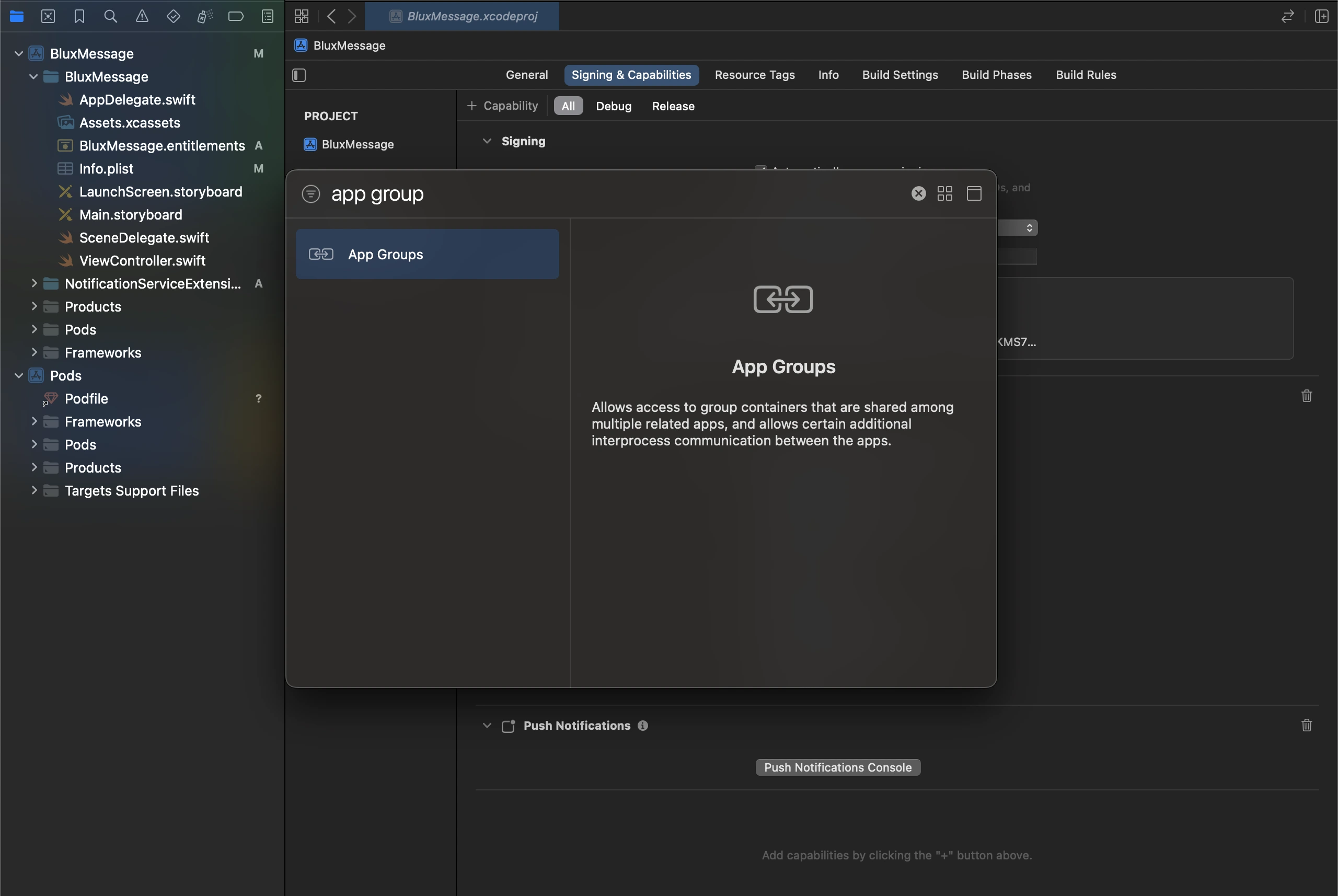
- Xcode 프로젝트 설정의 Signing & Capabilities 탭에서 + Capability > App Groups 를 선택하여 추가합니다.
group.[Bundle ID].blux이라는 이름의 그룹을 추가합니다. Bundle ID는 메인 앱의 Bundle Identifier와 일치해야 합니다.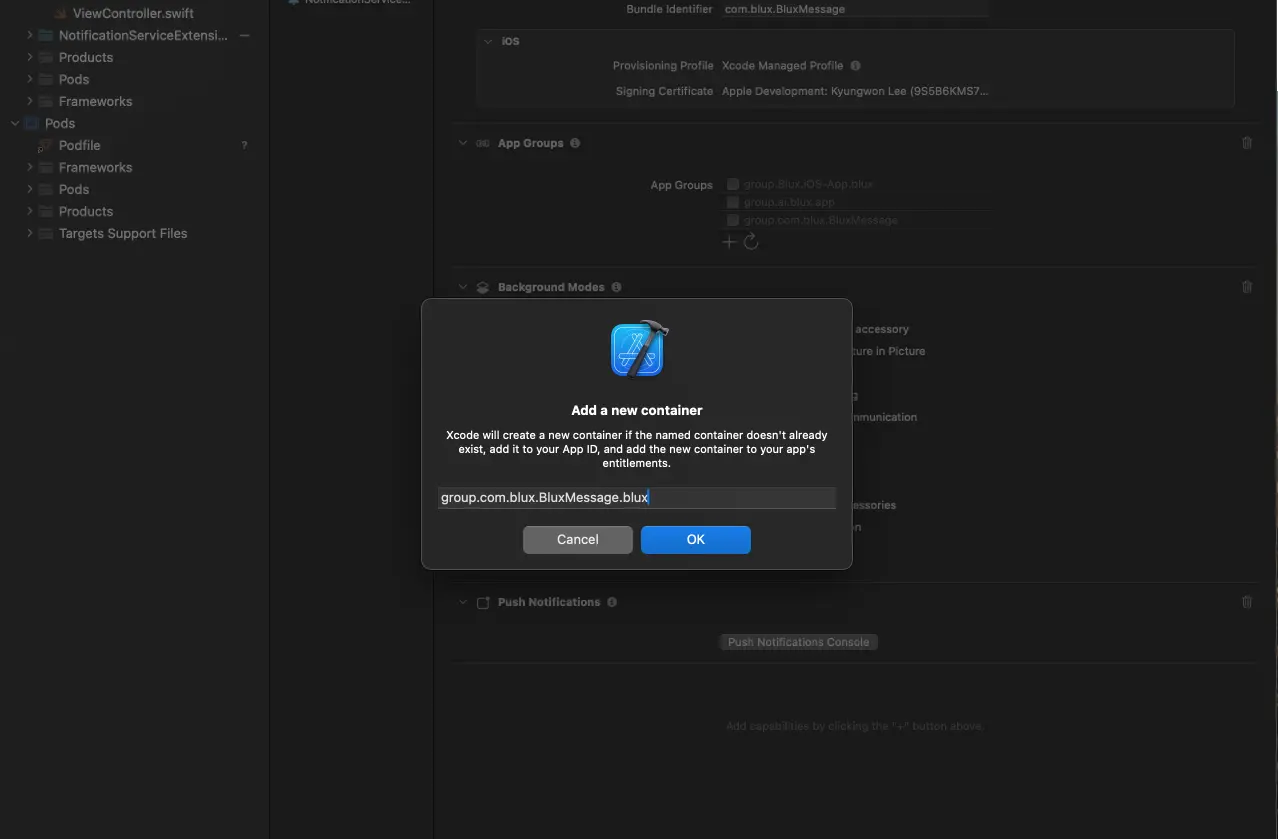
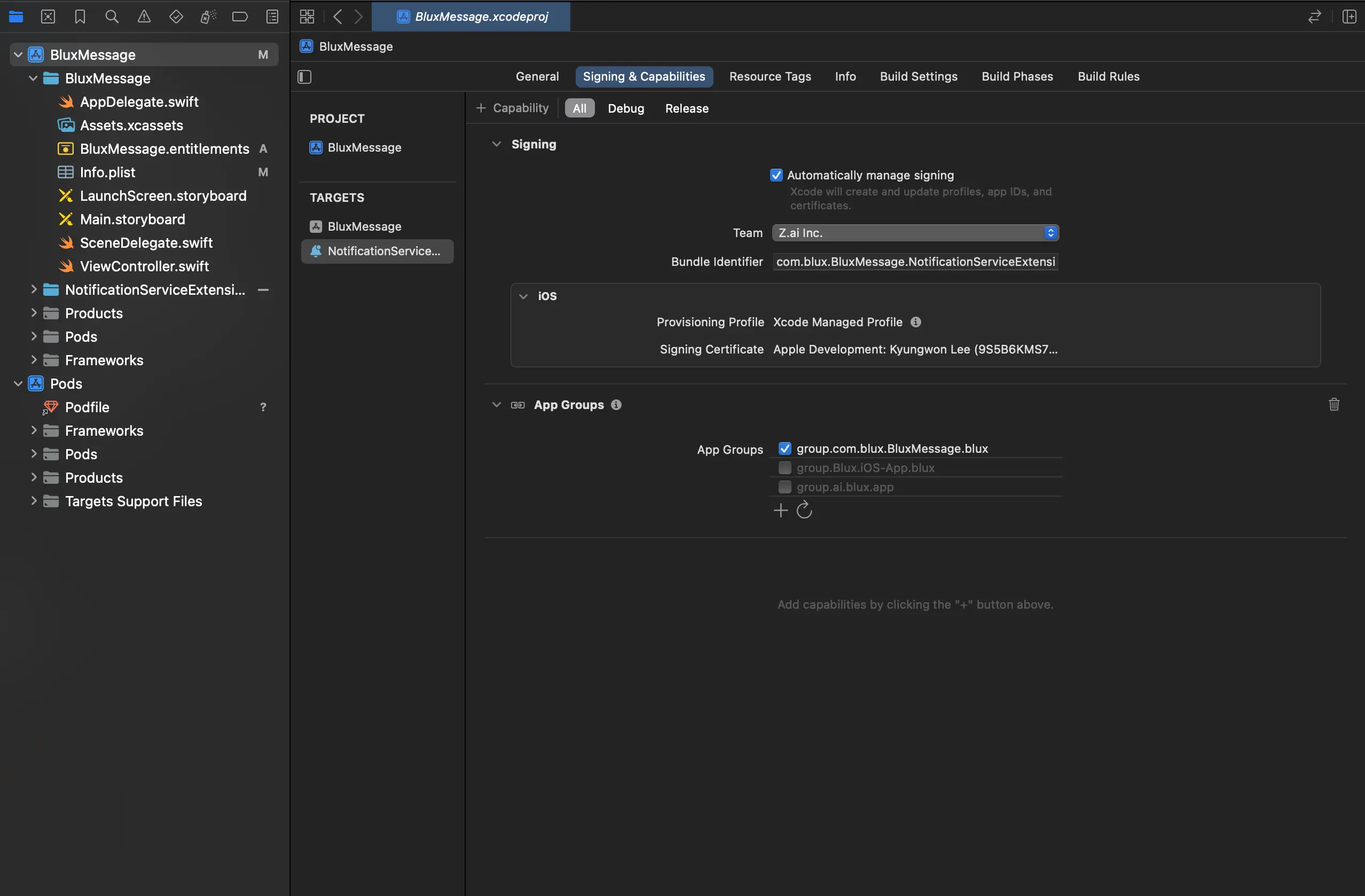
- 추가 후 해당 App Group을 활성화하고, 이전 단계에서 만든 Notification Service Extension에도 동일한 App Group을 추가하고 활성화합니다.
BluxAppGroupName 키 추가
- Xcode 프로젝트 설정의 Info 탭에서 Custom iOS Target Properties의 마지막 열을 클릭하고 오른쪽에 표시되는 + 버튼을 클릭합니다.
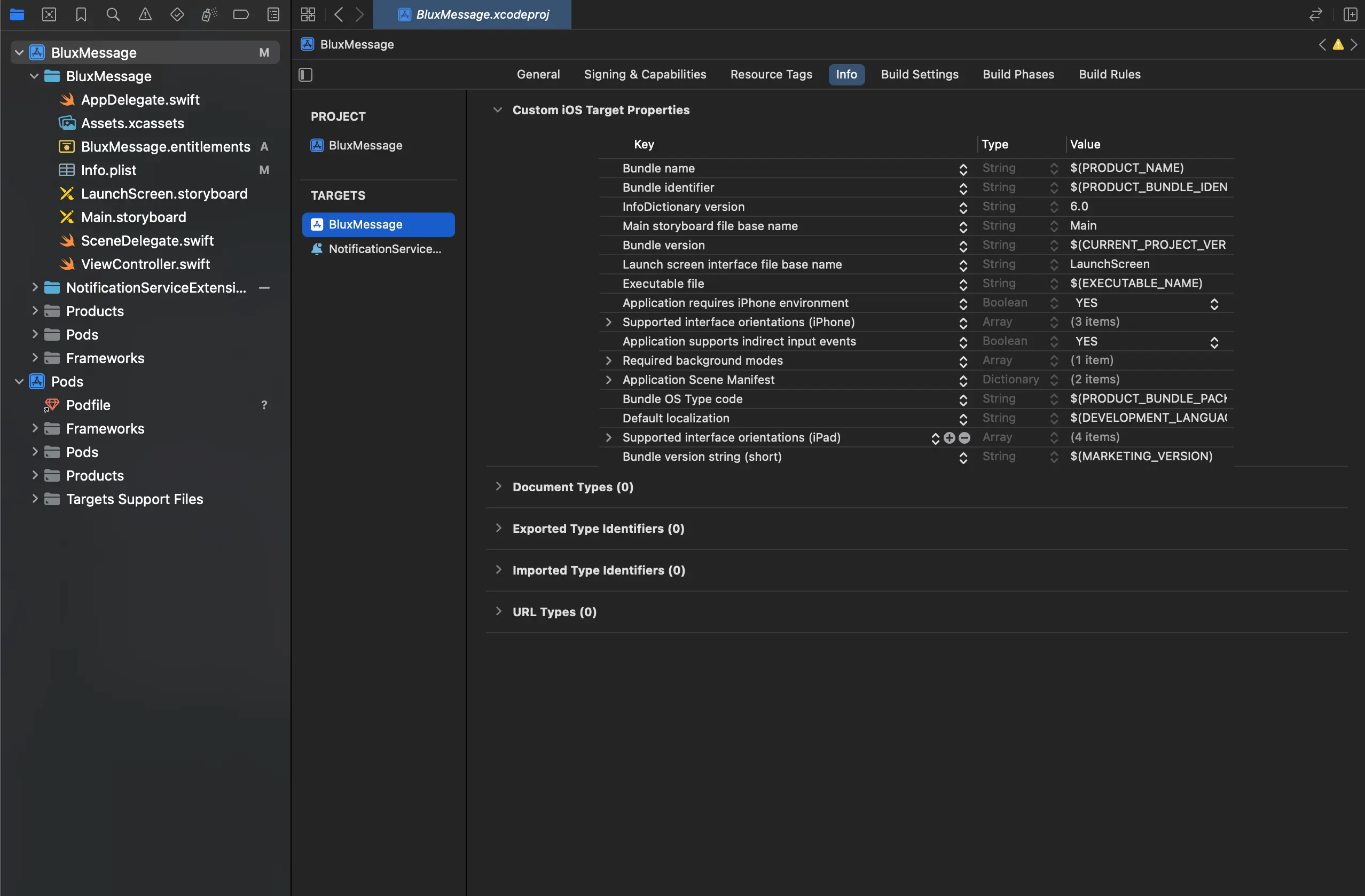
- Key는
BluxAppGroupName, Type은String, Value는 이전 단계에서 만든 App Group의 ID를 입력합니다.
- App Group ID가 변경되는 경우 해당 값도 같이 변경해야 합니다.
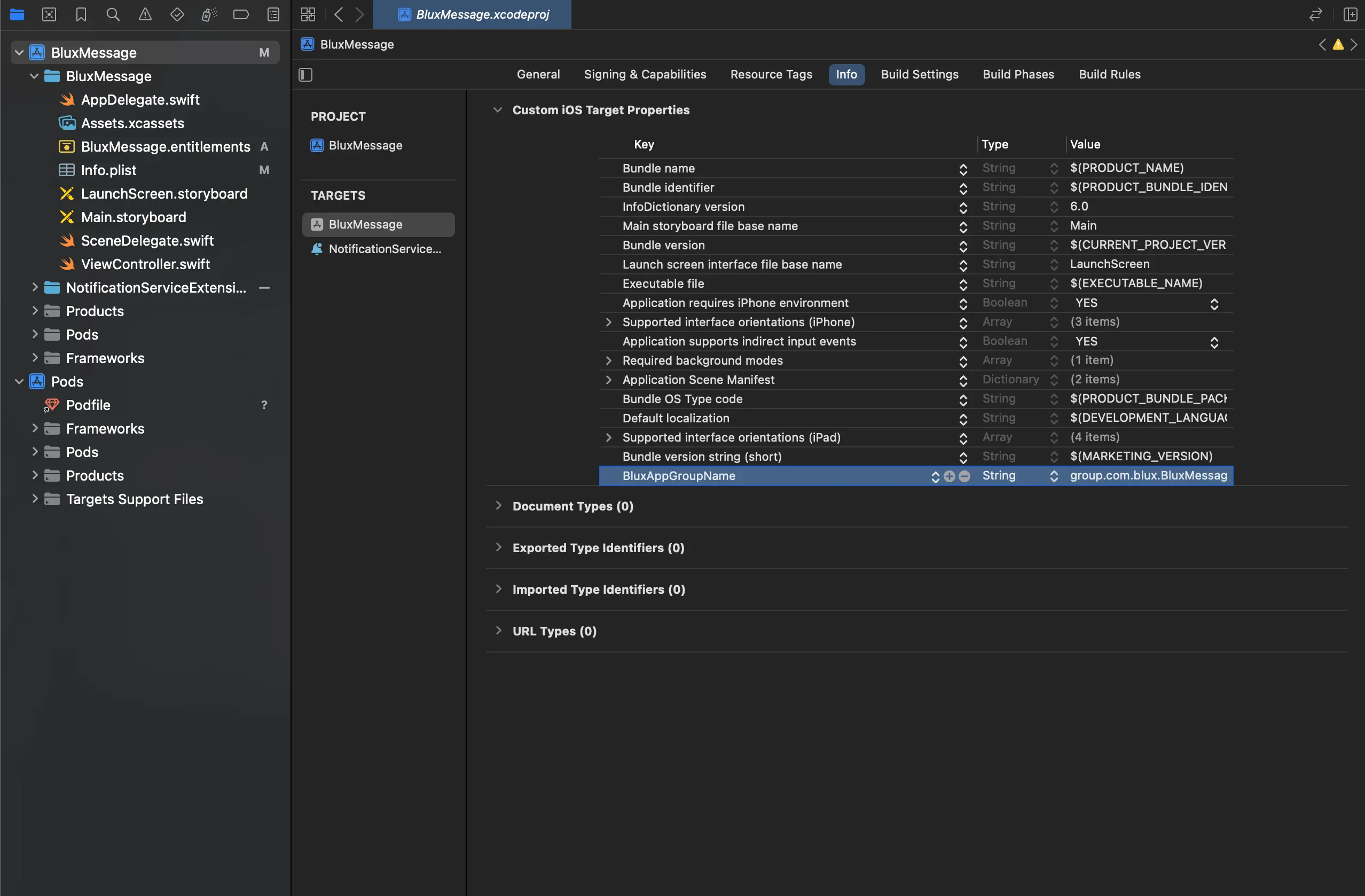 3.
3. BluxAppGroupName을 메인 앱 타깃과 Notification Service Extension 타깃 양쪽 모두에 추가해야 합니다. 누락 시 푸시 수신 집계가 되지 않습니다.
SDK 설치
블럭스 iOS SDK는 CocoaPods와 Swift Package Manager로 설치할 수 있어요.
- CocoaPods
- Swift Package Manager
프로젝트의 Podfile을 아래와 같이 설정하세요.
// 파일 최상단에 아래 줄을 추가하여 Dynamic Framework를 활성화합니다.
use_frameworks!

target 'YOUR_PROJECT_NAME' do
	...
	pod 'BluxClient'
end

// 파일 최하단의 아래 줄 추가
// 앞서 입력한 Extension의 Product Name을 target 이름으로 설정합니다.
target 'YOUR_NOTIFICATION_SERVICE_EXTENSION_TARGET_NAME' do
	pod 'BluxClient'
end
* Swift Package Manager 설치는 블럭스 iOS SDK 0.6.9 이상에서 지원됩니다.
패키지 추가
- Xcode 프로젝트 상단
File > Add Package Dependencies...를 클릭하세요. - 오른쪽 위 검색창에 저장소 주소
https://github.com/zaikorea/Blux-iOS-SDK.git를 입력하세요. - Dependency Rule에서 Up to Next Major Version을 선택하고 Add Package를 클릭하세요.
- Add to Target에서 메인 앱 타깃을 선택하고 Add Package를 클릭하세요.
Notification Service Extension 타깃에 추가
앞서 만든 Notification Service Extension 타깃 설정의 General 탭에서 Frameworks and Libraries의 + 버튼을 클릭하고 BluxClient를 추가하세요.
블럭스 SDK 연동
AppDelegate.swift 생성 (SwiftUI의 경우)
SwiftUI 프로젝트는 AppDelegate.swift가 존재하지 않기 때문에 별도의 설정이 필요합니다.
AppDelegate.swift 파일을 새로 만들고 기존 <YOUR_PROJECT_NAME>App.swift 파일을 일부 수정합니다.
(추가) AppDelegate.swift
import UIKit

class AppDelegate: NSObject, UIApplicationDelegate {
	func application(_ application: UIApplication, didFinishLaunchingWithOptions launchOptions: [UIApplication.LaunchOptionsKey : Any]? = nil) -> Bool {
		return true
	}
}
(기존) <YOUR_PROJECT_NAME>App.swift
struct <YOUR_PROJECT_NAME>App: App {

// 아래 코드 추가
@UIApplicationDelegateAdaptor(AppDelegate.self) var appDelegate
}
AppDelegate 메서드 추가
- 앱 실행 시,
BluxClient.initialize()메서드 호출 설정application(:didFinishLaunchingWithOptions:)메서드를 추가합니다.
AppDelegate.swiftimport BluxClient
class AppDelegate: UIResponder, UIApplicationDelegate {
// ...
func application(_ application: UIApplication, didFinishLaunchingWithOptions launchOptions: [UIApplication.LaunchOptionsKey: Any]?) -> Bool {
BluxClient.initialize(
launchOptions,
bluxApplicationId: "BLUX_APPLICATION_ID",
bluxAPIKey: "BLUX_API_KEY",
requestPermissionOnLaunch: true,
) { error in
if let error = error {
// SDK 초기화 실패
Logger.verbose("BluxClient.initialize error: \(error)")
} else {
// SDK 초기화 완료
Logger.verbose("BluxClient.initialize success")
// 자동 로그인의 경우 signIn() 호출
}
}
return true
}
// ...
} - 앱푸시 발송을 위한 푸시 토큰 수집 설정
application(:didRegisterForRemoteNotificationsWithDeviceToken:)메서드를 추가합니다.
AppDelegate.swiftimport BluxClient
class AppDelegate: UIResponder, UIApplicationDelegate {
// ...
func application(_ application: UIApplication, didRegisterForRemoteNotificationsWithDeviceToken deviceToken: Data) {
BluxAppDelegate.shared.application(application, didRegisterForRemoteNotificationsWithDeviceToken: deviceToken)
}
// ...
}
푸시 메시지 표시
AppDelegate에UNUserNotificationCenterDelegate를 지정합니다.- 발송된 앱푸시가 표시될 수 있도록
userNotificationCenter(:willPresent:withCompletionHandler:)메서드를 추가합니다.
import BluxClient

class AppDelegate: UIResponder, UIApplicationDelegate {
func application(_ application: UIApplication, didFinishLaunchingWithOptions launchOptions: [UIApplication.LaunchOptionsKey: Any]?) -> Bool {
UNUserNotificationCenter.current().delegate = self
}
}

extension AppDelegate: UNUserNotificationCenterDelegate {
func userNotificationCenter(_ center: UNUserNotificationCenter, willPresent notification: UNNotification, withCompletionHandler completionHandler: @escaping (UNNotificationPresentationOptions) -> Void) {
if BluxNotification.getBluxNotificationFromUNNotificationContent(notification.request.content) != nil {
BluxNotificationCenter.shared.userNotificationCenter(center, willPresent: notification, withCompletionHandler: completionHandler)
} else {
// 다른 푸시 공급자를 사용한다면 아래 줄 대신 해당 공급자 handler에 위임합니다.
// 위임받은 handler가 completionHandler를 정확히 한 번 호출해야 합니다.
completionHandler([])
}
}
}
푸시 메시지 성과 수집
userNotificationCenter(:didReceive:withCompletionHandler:)메서드를 추가합니다.- 앱푸시의 클릭 이벤트를 수집합니다.
import BluxClient

extension AppDelegate: UNUserNotificationCenterDelegate {
// ...

	func userNotificationCenter(_ center: UNUserNotificationCenter, didReceive response: UNNotificationResponse, withCompletionHandler completionHandler: @escaping () -> Void) {
		if BluxNotification.getBluxNotificationFromUNNotificationContent(response.notification.request.content) != nil {
			BluxNotificationCenter.shared.userNotificationCenter(center, didReceive: response, withCompletionHandler: completionHandler)
		} else {
			// 다른 푸시 공급자를 사용한다면 아래 줄 대신 해당 공급자 handler에 위임합니다.
			completionHandler()
		}
	}

}
- 앱
application(:didReceiveRemoteNotification:fetchCompletionHandler:)메서드를 추가합니다.- 앱푸시의 발송 성공 여부를 수집합니다.
import UserNotifications
import BluxClient

class NotificationService: UNNotificationServiceExtension {
	override func didReceive(_ request: UNNotificationRequest, withContentHandler contentHandler: @escaping (UNNotificationContent) -> Void) {
		if BluxNotificationServiceExtensionHelper.shared.isBluxNotification(request) {
			BluxNotificationServiceExtensionHelper.shared.didReceive(request, withContentHandler: contentHandler)
		} else {
			// 다른 푸시 공급자를 사용한다면 아래 줄 대신 해당 공급자 handler에 위임합니다.
			contentHandler(request.content)
		}
	}

	override func serviceExtensionTimeWillExpire() {
		// ...
		BluxNotificationServiceExtensionHelper.shared.serviceExtensionTimeWillExpire()
	}
}
BluxClient 초기화
initialize()
블럭스 iOS SDK의 모든 메서드는 BluxClient 객체의 static 메서드입니다. initialize()를 호출해서 SDK를 초기화하세요. 내 서비스의 애플리케이션 아이디와 API 키 정보는 연동 키 확인하기 에서 자세히 확인하세요.
* 모든 메서드는 SDK가 초기화 된 이후에 호출해야 합니다.
BluxClient.initialize(launchOptions, bluxApplicationId: "BLUX_APPLICATION_ID", bluxAPIKey: "BLUX_API_KEY", requestPermissionOnLaunch: true) { error in
	if let error = error {
		// SDK 초기화 실패
		Logger.verbose("BluxClient.initialize error: (error)")
	} else {
		// SDK 초기화 완료
		// 자동 로그인인 경우 signIn() 호출
		Logger.verbose("BluxClient.initialize success")
		BluxClient.signIn(userId: "USER_ID")
	}
}
파라미터
launchOptions필수[UIApplication.LaunchOptionsKey: Any]
앱 실행 시 전달되는 옵션입니다.
bluxApplicationId필수String
고객님의 서비스를 식별하는 고유 아이디입니다.
bluxAPIKey필수String
블럭스에서 발급하는 API 키입니다.
requestPermissionOnLaunch필수boolean
true라면, 앱 실행 시에 앱푸시 허용과 관련된 권한 요청 팝업을 띄웁니다.
completion((NSError?)) -> Void
SDK 초기화 완료 시 호출되는 핸들러입니다.
응답
void유저
signIn()
유저 로그인을 요청합니다. signIn()을 호출하지 않으면 블럭스 SDK는 유저를 식별할 수 없어요. 아래의 경우에 반드시 호출하세요.
① 회원 유저가 자동 로그인 한 시점
② 비회원 유저가 로그인하여 회원 유저로 식별되는 시점
// 회원 유저가 자동 로그인 한 시점
BluxClient.initialize(launchOptions, bluxApplicationId: "BLUX_APPLICATION_ID", bluxAPIKey: "BLUX_API_KEY", requestPermissionOnLaunch: true) { error in
	if let error = error {
		// SDK 초기화 실패
		Logger.verbose("BluxClient.initialize error: (error)")
	} else {
		// SDK 초기화 완료
		// 자동 로그인인 경우 signIn() 호출
		Logger.verbose("BluxClient.initialize success")
		BluxClient.signIn(userId: "USER_ID")
	}
}

// 비회원 유저가 로그인하여 회원 유저로 식별되는 시점
BluxClient.signIn(userId: "USER_ID")
파라미터
userId필수String
유저를 식별하는 고유 아이디입니다.
응답
voidsignOut()
유저 로그아웃을 요청합니다. 회원 유저가 로그아웃하는 시점에 호출하세요.
BluxClient.signOut()
응답
voidsetUserProperties()
유저의 전화번호, 이메일 주소, 광고 수신 동의 여부 등을 설정합니다.
BluxClient.setUserProperties(
	userProperties: UserProperties(
		phoneNumber: "01012345678",
		emailAddress: "test@blux.ai",
		marketingNotificationConsent: true
	)
)
파라미터
userProperties필수UserProperties
유저의 기본 정보입니다.
phoneNumbernilString
유저의 전화번호입니다. 블럭스의 문자/카카오톡 발송에 사용되고 있어요.
-없이 숫자로만 구성된 문자열입니다.emailAddressnilString
유저의 이메일 주소입니다. 블럭스의 이메일 발송에 사용되고 있어요.
agenilInt
유저의 나이입니다.
gendernilGender
유저의 성별입니다.
.male,.female중 하나를 입력하세요.marketingNotificationConsentnilBool
광고 수신 전역 동의 설정입니다. 전역 동의 또는 채널별 동의 둘 중 하나라도
false면 해당 채널의 광고 수신은 거부됩니다. 둘 다 미설정이어도 해당 채널은 거부됩니다.marketingNotificationSmsConsentnilBool
광고 문자 수신 동의 여부입니다.
marketingNotificationEmailConsentnilBool
광고 이메일 수신 동의 여부입니다.
marketingNotificationPushConsentnilBool
광고 푸시 알림 수신 동의 여부입니다.
marketingNotificationKakaoConsentnilBool
광고 카카오톡 수신 동의 여부입니다.
nighttimeNotificationConsentnilBool
야간 수신 동의 여부입니다.
isAllNotificationBlockednilBool
true이면 광고/비광고 구분 없이 모든 채널의 수신이 거부됩니다.
응답
voidsetCustomUserProperties()
setUserProperties()로 설정하는 기본 정보 이외의 추가 정보를 설정합니다.
BluxClient.setCustomUserProperties(
	customUserProperties: [
		"membership_level": "GOLD",
		"available_points": 12000,
		"is_active": true,
		"last_login_date": "2025-06-17T11:15:00.123+09:00",
	]
)
파라미터
customUserProperties필수[String: Any?]
유저의 추가 정보입니다. 예를 들어, 회원 등급, 잔여 포인트, 활성 여부, 최근 로그인 일시 등을 설정할 수 있습니다. 블럭스의 유저 세그멘테이션에 사용되고 있어요.
응답
void이벤트
Event 객체
유저의 행동 데이터를 담고 있는 객체입니다. 행동의 종류, 정보, 발생 시간 등을 자세히 알 수 있습니다.
기본 이벤트
기본 이벤트는 블럭스가 미리 정의해 둔 이벤트 객체입니다. 자주 쓰이는 장바구니 담기, 좋아요 누르기, 상세페이지 진입하기 등의 이벤트를 포함합니다.
AddProductDetailViewEvent
유저가 상품의 상세 정보를 탐색한 순간이에요. 예를 들어, 유저가 상품의 상세페이지에 진입한 순간을 의미해요.
let eventRequest = try AddProductDetailViewEvent.Builder(itemId: "ITEM_ID")
	.customEventProperties(["key": "value"])
	.build()
BluxClient.sendEvent(eventRequest)
객체 상세
itemId필수String
상품을 식별하는 고유 아이디입니다. 연동 시 사용한 상품 아이디를 입력하세요.
customEventPropertiesMap<string, object>
이벤트 추가 속성입니다. 위 속성 이외의 속성을 추가하고 싶다면 이 필드를 사용하세요.
AddCartaddEvent
유저가 상품에 대한 강한 선호를 표현한 순간이에요. 예를 들어, 유저가 상품을 장바구니에 담은 순간을 의미해요.
let eventRequest = try AddCartaddEvent.Builder(itemId: "ITEM_ID")
	.customEventProperties(["key": "value"])
	.build()
BluxClient.sendEvent(eventRequest)
객체 상세
itemId필수String
상품을 식별하는 고유 아이디입니다. 연동 시 사용한 상품 아이디를 입력하세요.
customEventPropertiesMap<string, object>
이벤트 추가 속성입니다. 위 속성 이외의 속성을 추가하고 싶다면 이 필드를 사용하세요.
AddOrderEvent
유저가 상품을 구매하여 비용을 지불한 순간이에요.
let eventRequest = try AddOrderEvent.Builder()
	.addItem(id: "ITEM_ID_1", price: 2000, quantity: 1)
	.addItem(id: "ITEM_ID_2", price: 4000, quantity: 2)
	.orderId("ORDER_ID")
	.orderAmount(12000)
	.paidAmount(10000)
	.customEventProperties(["coupons": .stringArray(["a", "b"])])
	.build()
BluxClient.sendEvent(eventRequest)
객체 상세
items필수List<item>
주문에 포함된 상품 목록입니다. 상품 아이디 (id), 상품 가격 (price), 상품 수량 (quantity)을 입력하세요.
orderId필수String
주문을 식별하는 고유 아이디입니다.
orderAmount필수Number
해당 주문건의 총 주문 금액입니다.
paidAmount필수Number
유저가 해당 주문에서 실제 결제한 금액입니다. 캠페인 성과 페이지에서 해당 필드를 기준으로 계산됩니다.
customEventPropertiesMap<string, object>
이벤트 추가 속성입니다. 위 속성 이외의 속성을 추가하고 싶다면 이 필드를 사용하세요.
AddLikeEvent
유저가 상품에 대한 약한 선호를 표현한 순간이에요. 예를 들어, 유저가 상품에 좋아요 버튼을 누른 순간을 의미해요.
let eventRequest = try AddLikeEvent.Builder(itemId: "ITEM_ID")
	.customEventProperties(["key": "value"])
	.build()
BluxClient.sendEvent(eventRequest)
객체 상세
itemId필수String
상품을 식별하는 고유 아이디입니다. 연동 시 사용한 상품 아이디를 입력하세요.
customEventPropertiesMap<string, object>
이벤트 추가 속성입니다. 위 속성 이외의 속성을 추가하고 싶다면 이 필드를 사용하세요.
AddRateEvent
유저가 상품에 대한 선호를 구체적인 숫자로 표현한 순간이에요. 예를 들어, 유저가 상품에 별점을 남기는 순간을 의미해요.
let eventRequest = try AddRateEvent.Builder(itemId: "ITEM_ID", rating: 4.0)
	.customEventProperties(["key": "value"])
	.build()
BluxClient.sendEvent(eventRequest)
객체 상세
itemId필수String
상품을 식별하는 고유 아이디입니다. 연동 시 사용한 상품 아이디를 입력하세요.
rating필수Number
상품에 대한 유저의 평가 점수입니다.
customEventPropertiesMap<string, object>
이벤트 추가 속성입니다. 위 속성 이외의 속성을 추가하고 싶다면 이 필드를 사용하세요.
커스텀 이벤트
커스텀 이벤트는 고객님이 직접 정의할 수 있는 이벤트 객체입니다. 기본 이벤트가 아닌 행동 데이터를 수집해야 할 때 이용하세요
* 커스텀 이벤트 사용이 필요하다면, 블럭스에 문의하세요.
let eventRequest = try AddCustomEvent.Builder(eventType: "CUSTOM_EVENT_TYPE")
	.addItem(id: "ITEM_ID_1", price: 2000, quantity: 1)
	.addItem(id: "ITEM_ID_2", price: 4000, quantity: 2)
	.orderId("ORDER_ID")
	.orderAmount(2000)
	.paidAmount(3000)
	.page("PAGE")
	.customEventProperties(["test_custom": .stringArray(["a"]), "test_custom_2": .string("2025-06-16T12:34:56Z")])
	.build()
BluxClient.sendEvent(eventRequest)
객체 상세
itemsList<item>
주문에 포함된 상품 목록입니다. 상품 아이디 (id), 상품 가격 (price), 상품 수량 (quantity)을 입력하세요.
orderIdString
주문을 식별하는 고유 아이디입니다.
orderAmountNumber
해당 주문건의 총 주문 금액입니다.
paidAmountNumber
유저가 해당 주문에서 실제 결제한 금액입니다. 캠페인 성과 페이지에서 해당 필드를 기준으로 계산됩니다.
pageString
유저의 현재 페이지를 식별하는 문자열입니다.
customEventPropertiesMap<string, object>
이벤트 추가 속성입니다. 위 속성 이외의 속성을 추가하고 싶다면 이 필드를 사용하세요.
sendEvent()
유저의 행동 데이터를 블럭스 데이터베이스에 저장합니다.
let eventRequest = try AddOrderEvent.Builder()
	.addItem(id: "ITEM_ID_1", price: 2000, quantity: 1)
	.addItem(id: "ITEM_ID_2", price: 4000, quantity: 2)
	.orderId("ORDER_ID")
	.orderAmount(12000)
	.paidAmount(10000)
	.customEventProperties(["coupons": .stringArray(["a", "b"])])
	.build()

  BluxClient.sendEvent(eventRequest)
응답
void알림
pushToken
* iOS SDK 0.6.24 이상에서 지원됩니다.
BluxAppDelegate.shared.pushToken은 현재 프로세스에서 APNs 등록 콜백으로 받은 마지막 푸시 토큰입니다. APNs 등록 콜백 전에는 nil이며, 토큰 보유 여부는 알림 권한 상태와 무관합니다.
let pushToken: String? = BluxAppDelegate.shared.pushToken
initialize()의 완료는 APNs 등록 완료를 의미하지 않습니다. 블럭스 SDK 연동에 따라 APNs 등록 콜백을 BluxAppDelegate.shared에 전달한 뒤 조회하세요. requestPermissionOnLaunch가 false이면 앱에서 직접 UIApplication.shared.registerForRemoteNotifications()를 호출해야 합니다.
NSE 인터셉터
* iOS SDK 0.6.2 이상에서 지원됩니다.
Notification Service Extension의 BluxNotificationServiceExtensionHelper.shared.didReceive에 interceptor 클로저를 전달하면 백그라운드/킬 상태를 포함한 모든 푸시 수신 시점에 페이로드를 가로챌 수 있습니다. 호스트 앱의 자체 알림함에 메시지를 적재하거나 시스템 알림 표시를 가공할 때 사용합니다.
인터셉터는 NSE 익스텐션 프로세스에서 호출되므로 메인 앱과 메모리 공간이 분리되어 있습니다. 메인 앱과 데이터를 공유하려면 Xcode 설정 단계에서 추가한 App Group의 UserDefaults나 공유 파일을 사용하세요.
NSE 안에서 푸시 수신 직후 호출되는 인터셉터를 등록합니다.
class NotificationService: UNNotificationServiceExtension {
override func didReceive(_ request: UNNotificationRequest, withContentHandler contentHandler: @escaping (UNNotificationContent) -> Void) {
	if BluxNotificationServiceExtensionHelper.shared.isBluxNotification(request) {
		BluxNotificationServiceExtensionHelper.shared.didReceive(request, withContentHandler: contentHandler) { request, content, notification in
			content.body = "[Blux] " + content.body
			// 호스트 앱의 자체 알림함에 notification 적재
		}
	} else {
		// 다른 푸시 SDK가 있다면 해당 SDK의 NSE 처리, 없다면 원본 콘텐츠를 그대로 전달
		contentHandler(request.content)
	}
}

override func serviceExtensionTimeWillExpire() {
	BluxNotificationServiceExtensionHelper.shared.serviceExtensionTimeWillExpire()
}
}
파라미터
interceptor(UNNotificationRequest, UNMutableNotificationContent, BluxNotification?) -> Void
푸시 수신 시 실행되는 인터셉터입니다. content를 수정하여 시스템 알림 표시를 가공할 수 있고, notification 객체로 푸시 페이로드에 접근할 수 있습니다.
응답
voidsetNotificationForegroundWillDisplayHandler()
* iOS SDK 0.6.2 이상에서 지원됩니다.
앱이 포그라운드인 상태에서 푸시를 수신했을 때, SDK가 시스템 알림을 표시하기 직전에 호출되는 핸들러를 등록합니다. 핸들러 안에서 event.display()를 명시적으로 호출해야 시스템 알림이 표시되므로, 포그라운드에서는 시스템 알림을 띄우지 않고 인앱 UI로만 표시하는 등의 제어가 가능합니다.
포그라운드 푸시 수신 시 표시 직전에 호출되는 핸들러를 등록합니다.
BluxClient.setNotificationForegroundWillDisplayHandler { event in
event.display()
}
파라미터
callback필수(NotificationReceivedEvent) -> Void
포그라운드 푸시 수신 시 실행되는 핸들러입니다. event.display()를 호출하지 않으면 시스템 알림이 표시되지 않습니다.
응답
voidsetNotificationClickedHandler()
* iOS SDK 0.6.2 이상에서 지원됩니다.
유저가 푸시 알림을 클릭했을 때 호출되는 핸들러를 등록합니다. 알림함 read 처리, 클릭 추적, 호스트 앱 자체 화면 전환 등에 사용합니다.
푸시 알림 클릭 시 호출되는 핸들러를 등록합니다.
BluxClient.setNotificationClickedHandler { notification in
// notification.url, notification.data 등으로 호스트 앱 화면 전환 / read 처리
}
파라미터
callback필수(BluxNotification) -> Void
푸시 알림 클릭 시 실행되는 핸들러입니다. 클릭된 푸시의 BluxNotification 객체가 전달됩니다.
응답
voidsetNotificationUrlOpenOptions()
* iOS SDK 0.6.2 이상에서 지원됩니다.
푸시 알림 클릭 시 알림에 실린 http/https URL을 SDK가 어떻게 열지 정합니다. 인앱용 setInAppUrlOpenOptions와 동일한 HttpUrlOpenTarget을 사용하지만 별도 저장 키로 분리되어 있어 알림과 인앱 정책을 독립적으로 설정할 수 있습니다.
푸시 알림 URL 오픈 동작을 설정합니다.
BluxClient.setNotificationUrlOpenOptions(
NotificationUrlOpenOptions(httpUrlOpenTarget: .externalBrowser)
)
파라미터
options필수NotificationUrlOpenOptions
푸시 알림 URL 오픈 옵션입니다.
httpUrlOpenTargetHttpUrlOpenTarget
URL 오픈 대상입니다. 다음 세 값 중 하나입니다.
.internalWebView— 기본. SDK 내장 WebView 로 표시합니다..externalBrowser— OS 외부 브라우저(Safari)로 열기. Universal Links가 등록된 호스트는 OS가 자기 앱으로 라우팅합니다..none— SDK가 URL 을 열지 않습니다. 호스트 앱이 알림 클릭 핸들러로 자체 처리할 때 사용합니다.
응답
voidCustom HTML 인앱 메시지
Custom HTML 인앱 메시지를 사용하면 자유로운 형태의 인앱 메시지를 표시하고, 앱 내에서 커스텀 액션을 처리할 수 있습니다.
개인화 변수
HTML 본문에 {{ 변수명 }} 문법으로 유저 속성을 참조할 수 있습니다. 값이 없는 변수가 하나라도 있으면 그 유저에게는 인앱 메시지가 표시되지 않으므로, default 필터로 기본값을 지정하는 것을 권장합니다. 값이 없을 때 그 자리를 비워 두려면 default: ""를 씁니다.
<h1>{{ name | default: "고객" }}님 안녕하세요</h1>
<p>{{ phone_number }}</p>
사용 가능한 전체 변수 목록은 블럭스 콘솔의 Custom HTML 에디터에서 확인할 수 있습니다.
변수 출력과 default 필터만 지원합니다. {% if %}, {% for %} 등 제어 태그나
upcase, round 등 다른 필터는 사용할 수 없습니다. 잘못된 문법은 인앱 메시지
저장 시 차단됩니다.
유저 속성 값에 포함된 HTML 특수문자는 서버에서 자동으로 이스케이프되어 표시됩니다. 따라서 유저 입력값을 변수로 사용해도 XSS 위험이 없습니다.
BluxBridge API
Custom HTML 인앱 메시지 내에서 BluxBridge 객체를 사용하여 SDK와 통신할 수 있습니다.
BluxBridge.triggerAction()
BluxBridge.triggerAction(actionId, data?, shouldDismiss?)
파라미터
actionId필수String
액션 식별자입니다. 커스텀 핸들러에서 어떤 액션인지 구분하는 데 사용됩니다.
dataObject
액션과 함께 전달할 데이터입니다. 기본값은 빈 객체({})입니다.
shouldDismissBoolean
인앱 메시지를 닫을지 여부입니다. 기본값은 true입니다. 즉, 별도로 지정하지 않으면 액션 호출 시 인앱 메시지가 자동으로 닫힙니다. 인앱 메시지를 유지하려면 명시적으로 false를 전달하세요.
사용 예시
<!-- 기본 사용: 닫기 버튼 (shouldDismiss 기본값 true) -->
<button onclick="BluxBridge.triggerAction('close')">닫기</button>

<!-- 커스텀 액션 호출 (기본적으로 인앱 닫힘) -->
<button
  onclick="BluxBridge.triggerAction('share', { url: 'https://example.com' })"
>
  공유하기
</button>

<!-- 인앱 메시지 유지: shouldDismiss를 false로 설정 -->
<button onclick="BluxBridge.triggerAction('like', { itemId: '123' }, false)">
  좋아요
</button>
shouldDismiss의 기본값이 true이므로, 대부분의 버튼 클릭은 자동으로 인앱
메시지를 닫습니다. 비동기 작업 후 수동으로 닫아야 하거나, 인앱 메시지를 유지한
채 여러 액션을 처리하려면 shouldDismiss: false를 사용하세요.
BluxBridge.resize()
* iOS SDK 0.6.12 이상에서 지원됩니다.
인앱 메시지의 크기와 위치를 변경합니다. 두 가지 방식을 지원합니다.
resize()를 호출하면 인앱 메시지가 지정한 크기만큼만 화면을 차지하고, 바깥 영역은 뒤쪽 화면의 터치가 그대로 전달됩니다. 호출하지 않으면 인앱 메시지가 전체 화면을 덮어 뒤쪽 UI가 동작하지 않으므로, 배너처럼 일부 영역만 차지하려면 반드시 resize()를 호출해야 합니다.
배너 모드 — 화면 상단 또는 하단에 배너 형태로 배치합니다.
BluxBridge.resize({ height, location });
파라미터
height필수number
배너의 높이(px)입니다.
location필수'top' | 'bottom'
배너를 화면 상단에 배치할지 하단에 배치할지 지정합니다.
절대 위치 모드 — 화면의 원하는 위치에 자유롭게 배치합니다.
BluxBridge.resize({ width?, height?, top?, bottom?, left?, right? })
파라미터
widthnumber
인앱 메시지의 너비(px)입니다. 지정하지 않으면 기준 영역 너비에서 left와 right를 뺀 값으로 자동 계산됩니다.
heightnumber
인앱 메시지의 높이(px)입니다. 지정하지 않으면 기준 영역 높이에서 top과 bottom을 뺀 값으로 자동 계산됩니다.
topnumber
기준 영역 상단으로부터의 거리(px)입니다.
bottomnumber
기준 영역 하단으로부터의 거리(px)입니다.
leftnumber
기준 영역 좌측으로부터의 거리(px)입니다.
rightnumber
기준 영역 우측으로부터의 거리(px)입니다.
사용 예시
<!-- 배너 모드: 하단 배너 -->
<button onclick="BluxBridge.resize({ height: 80, location: 'bottom' })">
  하단 배너
</button>

<!-- 절대 위치: 하단 바 -->
<button
  onclick="BluxBridge.resize({ height: 70, bottom: 16, left: 16, right: 16 })"
>
  하단 바
</button>

<!-- 절대 위치: 우상단 토스트 -->
<button
  onclick="BluxBridge.resize({ width: 320, height: 60, top: 20, right: 20 })"
>
  토스트
</button>

<!-- 절대 위치: 좌하단 플로팅 -->
<button
  onclick="BluxBridge.resize({ width: 200, height: 64, bottom: 80, left: 16 })"
>
  플로팅 위젯
</button>
iOS SDK 0.6.21부터 절대 위치 좌표의 기준 영역은 safe area 안쪽입니다.
width/height를 지정하지 않으면 기준 영역에서 해당 축의 여백을 뺀 값으로
자동 계산되므로, left와 right를 함께 지정해 너비를 정할 수 있습니다.
0.6.20 이하는 safe area를 적용하지 않고 width/height를 생략하면 화면
전체로 표시되므로, 여백과 크기를 직접 지정해야 합니다. 기존에
env(safe-area-inset-*) 값을 좌표에 직접 더해 사용했다면 0.6.21 이상으로
올릴 때 그 보정을 제거하세요. 그대로 두면 여백이 이중으로 적용됩니다.
BluxBridge.close()
인앱 메시지를 닫으며, 선택적으로 특정 기간 동안 다시 표시하지 않도록 설정합니다.
BluxBridge.close(daysToHide?)
파라미터
daysToHidenumber
인앱 메시지를 다시 표시하지 않을 일수입니다. 생략하거나 0을 전달하면 닫기만 합니다.
<!-- 7일간 보지 않기 -->
<button onclick="BluxBridge.close(7)">7일간 보지 않기</button>

<!-- 1일간 보지 않기 -->
<button onclick="BluxBridge.close(1)">오늘 하루 보지 않기</button>

<!-- 닫기만 -->
<button onclick="BluxBridge.close()">닫기</button>
클릭 추적 (data-blux-click)
data-blux-click 속성을 사용하면 요소 클릭 시 자동으로 inapp_opened 이벤트가 전송됩니다. 인앱 메시지 내 버튼 클릭률을 추적할 때 사용합니다.
<!-- 클릭 시 inapp_opened 이벤트 전송 -->
<a href="https://example.com" data-blux-click="main-cta">자세히 보기</a>

<!-- 버튼에도 사용 가능 -->
<button data-blux-click="secondary-cta" onclick="...">확인</button>
data-blux-click 속성이 있는 요소를 클릭하면 inapp_opened 이벤트가
전송되지만, 인앱 메시지는 닫히지 않습니다. 인앱 메시지를 닫으려면
BluxBridge.triggerAction('close')를 호출하세요.
addInAppCustomActionHandler()
Custom HTML 인앱 메시지에서 BluxBridge.triggerAction() 호출 시 실행될 핸들러를 등록합니다. 여러 핸들러를 등록할 수 있으며, 등록 순서대로 실행됩니다.
let unsubscribe = BluxClient.addInAppCustomActionHandler { actionId, data in
if actionId == "share" {
	// 공유 로직 구현
	let url = data["url"] as? String ?? ""
	// ...
} else if actionId == "navigate" {
	// 화면 이동 로직 구현
	let screen = data["screen"] as? String ?? ""
	// ...
}
}

// 핸들러 제거
unsubscribe()
파라미터
callback필수(_ actionId: String, _ data: [String: Any]) -> Void
커스텀 액션 핸들러 클로저입니다.
actionId필수String
액션 식별자입니다. HTML에서
triggerAction()의 첫 번째 인자로 전달한 값입니다.data필수[String: Any]
액션과 함께 전달된 데이터입니다. HTML에서
triggerAction()의 두 번째 인자로 전달한 값입니다.
응답
FunctiondismissInApp()
현재 표시 중인 인앱 메시지를 프로그래밍 방식으로 닫습니다. 비동기 작업 완료 후 수동으로 인앱 메시지를 닫아야 할 때 사용합니다.
let unsubscribe = BluxClient.addInAppCustomActionHandler { actionId, data in
if actionId == "share" {
	let url = data["url"] as? String ?? ""
	// 비동기 공유 작업 수행
	Task {
		// await shareContent(url)
		// 비동기 작업 완료 후 수동으로 닫기
		BluxClient.dismissInApp()
	}
}
}

// HTML에서 shouldDismiss: false로 호출
// BluxBridge.triggerAction('share', { url: '...' }, false);
응답
voidsetInAppUrlOpenOptions()
* iOS SDK 0.6.14 이상에서 지원됩니다.
인앱 메시지의 http/https 링크를 클릭했을 때 SDK가 어떻게 열지 정합니다. 기본은 SDK 내장 WebView 로 열기이며, 외부 브라우저로 열거나 자동 오픈을 막는 옵션을 제공합니다. 그 외 커스텀 스킴은 본 정책의 영향을 받지 않고 기존 외부 앱 라우팅을 그대로 따릅니다.
옵션 값은 호스트 앱이 한 번 호출하면 App Group UserDefaults에 저장되어 콜드 스타트 후에도 유지됩니다. 알림용 setNotificationUrlOpenOptions와는 별도 키로 분리되어 있어 인앱과 알림 정책을 독립적으로 설정할 수 있습니다.
인앱 메시지의 URL 오픈 동작을 설정합니다.
BluxClient.setInAppUrlOpenOptions(
InAppUrlOpenOptions(httpUrlOpenTarget: .externalBrowser)
)
파라미터
options필수InAppUrlOpenOptions
인앱 메시지 URL 오픈 옵션입니다.
httpUrlOpenTargetHttpUrlOpenTarget
URL 오픈 대상입니다. 다음 세 값 중 하나입니다.
.internalWebView— 기본. SDK 내장 WebView 로 표시합니다..externalBrowser— OS 외부 브라우저(Safari)로 열기. Universal Links가 등록된 호스트는 OS가 자기 앱으로 라우팅합니다..none— SDK가 URL 을 열지 않습니다. 인앱 메시지는 닫히고 클릭 트래킹은 정상 발사됩니다.
응답
voidsetInAppClickedHandler()
* iOS SDK 0.6.17 이상에서 지원됩니다.
인앱 메시지의 http/https 링크가 클릭됐을 때 호출될 콜백을 등록합니다. 호스트 앱이 자체 라우터로 URL을 처리하고 싶을 때 사용합니다. 핸들러가 등록되어 있으면 SDK는 URL 자동 오픈을 건너뛰고 콜백만 호출합니다. 클릭 트래킹(inapp_opened)과 인앱 닫기는 정상 수행됩니다.
핸들러가 등록되지 않았을 때는 기존 setInAppUrlOpenOptions 정책(기본 .internalWebView)을 따릅니다. Custom HTML 인앱의 BluxBridge.triggerAction() 경로는 본 핸들러의 영향을 받지 않습니다.
인앱 메시지의 링크 클릭 콜백을 등록합니다.
BluxClient.setInAppClickedHandler { inApp in
if let url = inApp.url {
	// 호스트 앱의 자체 라우터로 URL 처리
	myRouter.navigate(to: url)
}
}
파라미터
callback필수((BluxInApp) -> Void)?
인앱 메시지 클릭 핸들러 클로저입니다. nil을 전달하면 등록된 핸들러가 해제되어 기존 setInAppUrlOpenOptions 정책으로 복귀합니다.
inApp필수BluxInApp
클릭된 인앱 메시지 정보입니다.
id필수String
인앱 메시지 식별자입니다.
urlString?
클릭한 링크의 URL 입니다. URL이 없거나 빈 문자열인 경우
nil입니다.
응답
void